The IoT Sparkplug EIE allows a user to write a payload using a Sparkplug command (DCMD/NCMD) manually through the "Command – Device" (CmdDev) or "Command – Edge Node" (CmdNode) data groups using the data group editor or via a UIS command. The commands are defined in the template file, and include items such as rebirth, reboot, scan rate, and next server.
See UIS Command Component Parameters for more information.
The "Command – Device" (CmdDev) data group sends a device Sparkplug command (DCMD). Commands are defined in the template file in the "commands" section for a data group.
The "Command – Edge Node" (CmdNode) data group sends an edge-node Sparkplug command (NCMD). Commands are defined in the template file in the "commands" section for a data group.
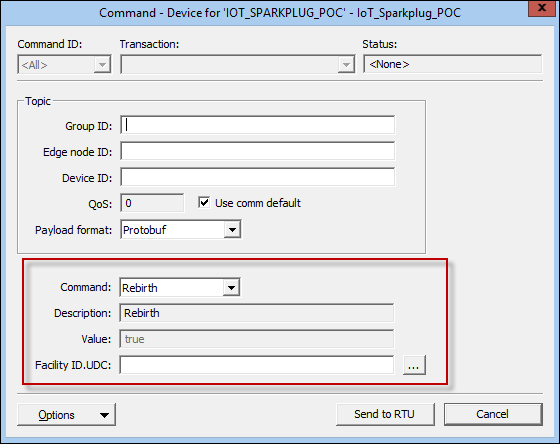
The Command-type data groups are configured within the View Data dialog box of the data group. To configure the Topic section, see the IoT Sparkplug Data Group Properties table. The following is an example of a View Data dialog box for a CmdDev data group.
To configure the command for a "Command – Device" (CmdDev) or "Command – Edge Node" (CmdNode) data group, make selections from the fields below the Topic section.
| Property | Description |
|---|---|
|
Command |
Select an option from the drop-down menu. Commands are defined in the template file, and include items such as:
|
|
Description |
Displays the description of the command from the template file. |
|
Value |
Displays the value of the command from the template file (if indicated) or allows an entry in the field when not set in the template file. |
|
Facility ID.UDC |
Enter a facility and UDC, or click … to open the Choose UDC for element dialog box. The Facility ID is used only in point processing. |
|
|
|

